Rogue Page Elements From Reused Webflow CMS Content
Reused a Webflow component and got a rogue H1 and wrong og:title from empty CMS cells? Here's the actual fix, and how to stop it happening again.
If you reused a Webflow component backed by a CMS Collection and a rogue page element showed up — a wrong H1, the wrong og:title, a missing card image — the cause is almost always empty CMS cells still rendering hidden content into your page source. The fix: make each cell visible only when its CMS field actually has a value. That's it. The long version is below, because the way I found it was a proper head-scratcher.

Here's what I was doing. I took a previously built schedule layout and reused it on another page. Then I used a CMS Collection to inject the speakers into the different sections of the line-up. Each city had unique speakers per section, so a Collection was the sane way to handle it. Clean idea. Mostly.
The problem: wrong title, no card image
After the page was built, I went through a last round of edits. When my marketing counterpart went to share the page, it kept coming back with the wrong title and no card image. Every time.

That was definitely not the title and description of this page. So I did the thing you do at 11pm: I started manually setting the og:title and the Twitter card title, hoping to brute-force it into behaving. It half-worked, which is worse than not working, because it meant the real title was still living somewhere on the page. I wanted to know where the content was actually coming from, so I inspected the page and searched for the stray text. Nothing. Stumped. It had to be coming from somewhere.
The ghost in the machine
I knew it was there, so I opened the raw page source and searched again — and sure enough, the text was sitting right in the markup. But going line by line through the Webflow Designer, the title was nowhere to be found. That's the maddening part: present in the output, invisible in the editor. I went looking for where the random content was getting injected.
Then it clicked. This event had fewer speakers than the others, so a couple of cells in the reused layout were sitting there empty — not deleted, just unused. Webflow was still rendering those empty cells, and their leftover CMS-bound markup was leaking into the page as a phantom H1 and meta content. The cells you can't see in the canvas were still very much on the page.
The fix was to make each cell render only when it has something to render — set it to be visible only if the speaker image is set:
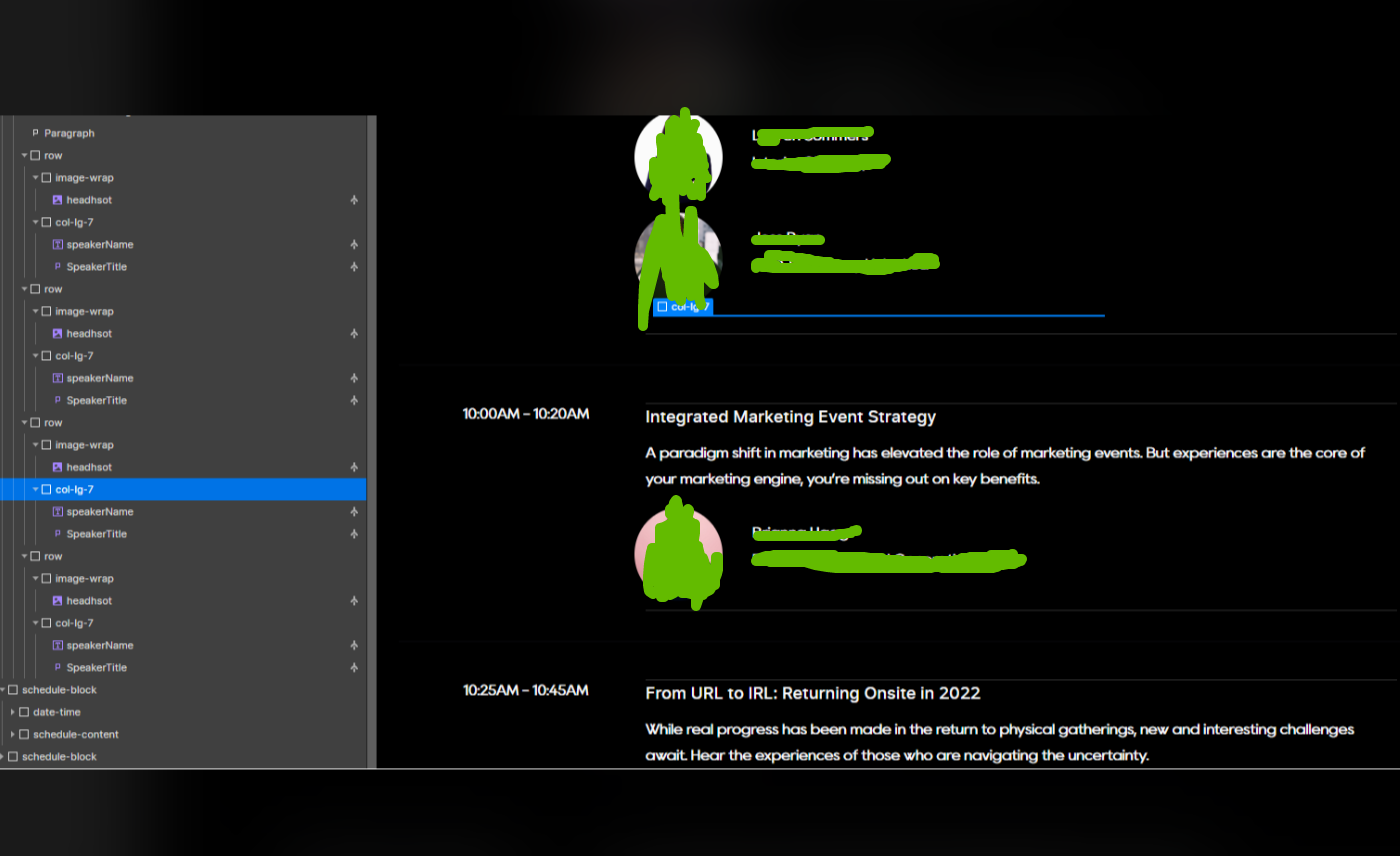
Voila. That killed the rogue H1 problem. Conditional visibility tied to a real field means empty cells stop emitting markup, and the ghost goes back where it came from.
Why this happens
Webflow is a great product, but everything has its bugs, and this is one of the edge cases that bites you when you reuse content instead of rebuilding from scratch. A reused layout carries its full cell structure with it, including the cells you don't need for this particular Collection item. Those empty cells don't vanish — they render with whatever default or bound content they were holding, and that's how a title from one context ends up on a page in another. I filed this with our Webflow rep to pass to the engineering team, because doing our part to improve the platform beats grumbling about it.
This is the same lesson behind most messy projects I get handed: reuse without discipline is how a clean Webflow build slowly becomes a junk drawer. For more on staying out of that hole, see our 10 Webflow development mistakes to avoid and our Webflow development best practices. When the gremlins go deeper than one stray cell, this is exactly the kind of thing our Webflow development agency untangles for clients, and it's why we audit a build before we trust it.
FAQ
Why is a rogue H1 or wrong title showing up on my reused Webflow page? Almost always because the reused layout includes empty CMS cells that still render into the page source. Their leftover bound content leaks out as a phantom H1 or meta value, even though you can't see those cells in the Designer.
Why can't I find the bad title in the Webflow Designer? Because it lives in an unused, empty cell that the canvas doesn't surface clearly. Open the raw page source (View Source, not the inspector) and search for the stray text — you'll find it sitting in the markup, then trace it back to the empty cell rendering it.
How do I fix rogue elements from empty CMS cells? Set conditional visibility on each cell so it only renders when a real field has a value, such as a speaker image being present. Empty cells then stop emitting markup, and the rogue element disappears.
Should I keep reusing Webflow components backed by CMS Collections? Reuse is fine and often smart, but reuse with a check. When you drop a reused layout onto a Collection with fewer items, confirm the spare cells are conditionally hidden and view the page source before you ship. A two-minute look saves a marketing counterpart from sharing the wrong card.
Is this a Webflow bug or my mistake? A bit of both. Empty cells rendering hidden markup is unexpected behavior worth reporting, but conditional visibility is the supported, reliable way to handle variable-length CMS content. Build for it and the bug never gets a chance to bite.
Happy WebDeving.