How to Capture UTMs in Webflow and Pass Them to a Form
Capture UTMs in Webflow, persist them across pages with localStorage, and pass them into hidden form fields so your CRM finally knows where leads came from.
Need a tagged link right now? Use our build a tagged UTM link to generate clean UTM codes for Google Analytics in seconds, no sign-up, runs in your browser.
To capture UTMs in Webflow and pass them to a form, you run a small script in the project's <head> that reads the UTM parameters off the URL and saves them to the browser's localStorage, then a second script that reads them back out on form load and drops them into hidden fields. That's the whole trick: capture once, store, retrieve, submit. Do it right and the campaign that drove the click rides all the way into your CRM. Do it wrong and the lead shows up wearing a name tag that says "unknown."
Here's the scene I see constantly. A visitor clicks your paid ad — the link tagged utm_source, utm_medium, utm_campaign, the works. They land, they browse, they fill out your contact form two pages later. And the form submits with nothing attached, because by then the UTMs are long gone. The one campaign you can tie to a real click forgot where it came from somewhere between the landing page and the thank-you screen.
This post fixes that in Webflow specifically. The plumbing isn't clever — it's just plumbing — but get one value wrong and the whole attribution chain breaks.
What is a UTM?
A UTM is a tag you append to a link so analytics can tell where traffic came from. This little module attaches to any URL and generates Google Analytics data for every online platform you run — Facebook ads, Twitter, email, the lot. Done right, you can track a campaign all the way down the funnel to closed-won, which is the only place ROI actually lives.
That last part is the whole point. A UTM that dies at the first pageview tells you about traffic. A UTM that survives to the form tells you about revenue. We want the second one.
If you want the deeper background on building and formatting tags, here's the full guide to UTMs, and a related read on how UTM formats impact your pipeline. One warning up front: keep your mediums consistent and lowercase. Off-spec mediums vanish into the (Other) bucket where bad attribution goes to die, and they never come back.
How do UTMs work?
A UTM is a link you build, then use in your campaigns. It looks something like this:
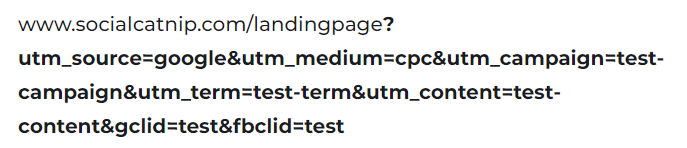
And here's a real one in the wild:
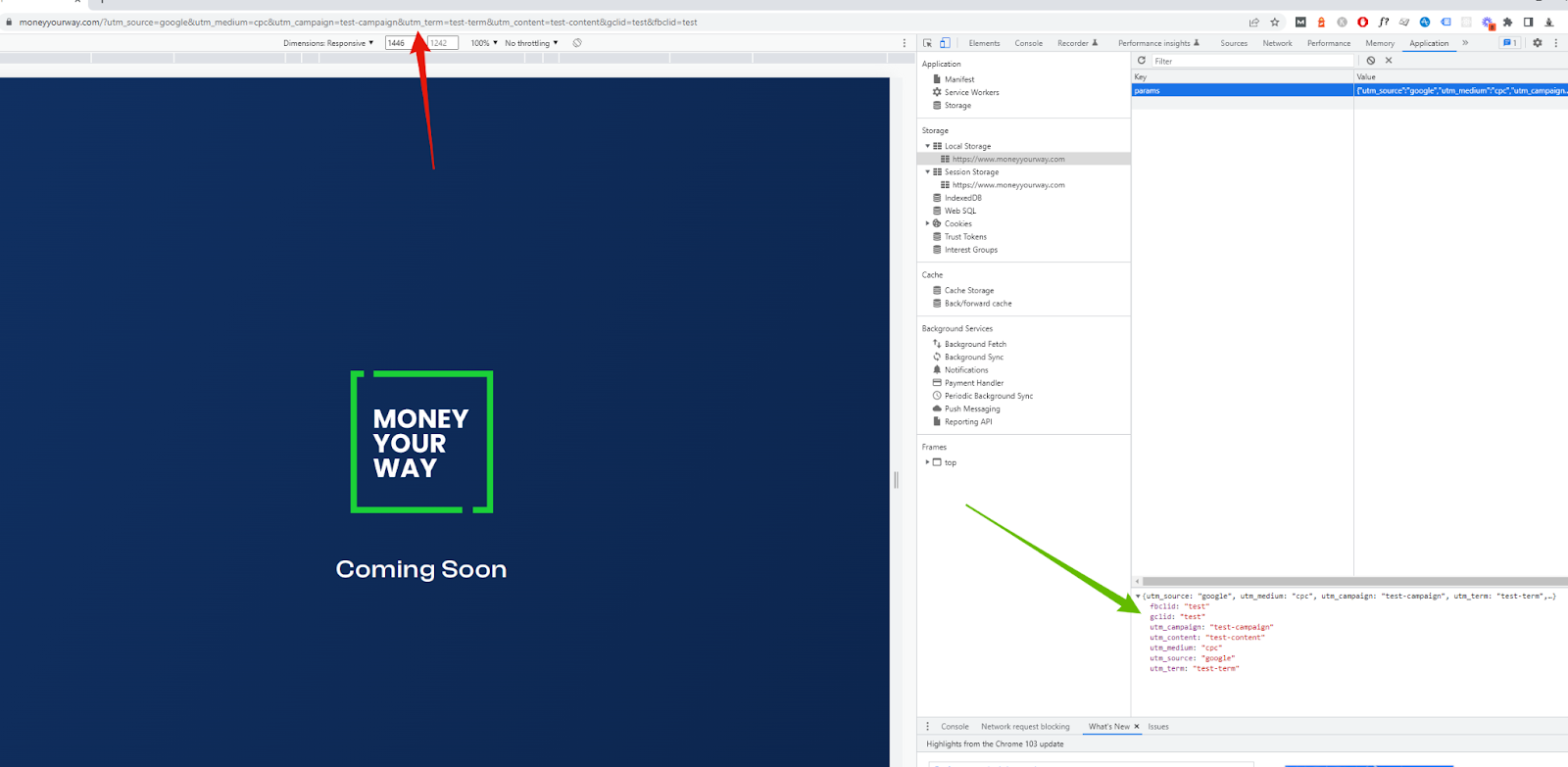
Capture the UTMs in the head of your Webflow project
We run a custom piece of code in the head of the project in Webflow to grab the UTMs. We want the UTMs to persist past the first page, so we use localStorage in the browser to save them for later.
Here's a confession that became the most important line of this script. When I first wrote this post, I was only using the code on one page. The problem: if you don't check whether the UTMs are already stored before you run getUTM, the function just overwrites them. So a visitor lands on your tagged ad URL, then clicks to a second page with a naked URL, and the script cheerfully wipes the good values with empties. The campaign you paid for, gone in one click.
The fix is a conditional. We look in localStorage for the UTMs first. If they're already there, we do nothing. If they're not, we extract them. That's the difference between attribution that survives and attribution that resets every pageview.
function getUTM() { let params = {}; const searchParams = new URLSearchParams(window.location.search); searchParams.forEach((value, key) => { params[key] = value; }); console.log("storing UTMs") localStorage.setItem('params', JSON.stringify(params)); } //adding this conditional check means the code wont overwrite the values once they are set. If (localStorage.getItem("params") && localStorage.getItem("params").length > 3) { console.log("do nothing"); } else { console.log("run utms"); getUTM(); }
Once that's running, you'll see the values land — the UTMs get stored in the params key in your browser's local storage. Open your dev tools, check the Application tab, and you'll watch them appear on the tagged URL and stay put as you click around. That persistence is the whole game.
Pass the stored UTMs into your form's hidden fields
Now we pull the UTMs back out of local storage and place them into hidden fields on the contact form, ready for bottom-funnel measurement.
We run this on a document.ready because we want to make sure that if we're using something like a Marketo form, it's fully loaded before we try to insert the UTMs. Fire too early and you're writing values into inputs that don't exist yet.
      $(document).ready(function () {
        console.log("fetching utms");
        var param = JSON.parse(localStorage.getItem("params"));
        console.log(param);
        let utm_source__c =
          param["utm_source"] == undefined ? "" : param["utm_source"];
        let utm_medium__c =
          param["utm_medium"] == undefined ? "" : param["utm_medium"];
        let utm_campaign__c =
          param["utm_campaign"] == undefined ? "" : param["utm_campaign"];
        let utm_content__c =
          param["utm_content"] == undefined ? "" : param["utm_content"];
        let utm_term__c =
          param["utm_term"] == undefined ? "" : param["utm_term"];
        let GCLID__c = param["gclid"] == undefined ? "" : param["gclid"];
        let FBCLID__c = param["fbclid"] == undefined ? "" : param["fbclid"];

        console.log(GCLID__c);
        let gclidInput = document.getElementById("input");
        gclidInput.value = GCLID__c;
      });
Now you just match the inputs on your form to the ones this code feeds the UTMs into. Notice the ternary operators on every line — they place a UTM if it's present and quietly fall back to an empty string if it isn't. That's not stylistic. If a visitor lands with no utm_term and you reference a value that doesn't exist, the script errors out and none of the UTMs make it to the form. The ternary is what keeps a missing term from torching the whole submission.
This is the part I beg clients to slow down on: mapping, mapping, and mapping. The field name in this script has to match the hidden field on the form, which has to match the field in your CRM. One mismatched value — utm_source on one side, source on the other — and the chain breaks. Not bends. Breaks.
Why this matters more than it looks
You'd be amazed how much pipeline gets laundered into "unknown" between the click and the CRM. We've spent years untangling these chains — seven on Webflow, seven in Google Tag Manager — and the failure is almost never the ad platform. It's a form that never carried the source through, or a medium typed two different ways. Closed-loop tracking, where the campaign survives from click to closed-won, is the difference between a number you believe and a fast number you don't.
If you'd rather not hand-wire this across every form on your site, that signal path — click to CRM, no lost source — is exactly the kind of thing we wire in. You can see how we approach it on our tracking and analytics services page. But the steps above are yours to run, and they work.
FAQ
Where do I put the capture script in Webflow? Add it to the project-wide head code (Project Settings → Custom Code → Head Code) so it runs on every page, or to a single page's head if you only want it on specific landing pages. Project-wide is safer, because visitors rarely convert on the page they land on.
Why use localStorage instead of a cookie? localStorage is simple, persists across pages and sessions, and doesn't get sent with every HTTP request. For a single-domain Webflow site it's plenty. If you need to carry UTMs to a different domain or subdomain, that's a different problem — see our guide on persisting UTMs across a subdomain or other website.
Why does my form keep submitting empty UTM values? Usually one of two things: the document.ready script fired before the form finished loading, or your hidden field names don't match the names in the script. Check the field mapping first — it's almost always the mapping.
What's the conditional check at the bottom of the capture script actually doing? It stops the script from overwriting good UTMs with empty ones. Without it, every pageview re-runs the capture and wipes the values from the original tagged URL. The check says: if UTMs are already stored, leave them alone.
Do I have to capture gclid and fbclid too? Only if you run Google or Meta ads and want to tie offline conversions back to those clicks. The script above grabs them already. If you don't use them, you can drop those lines — just don't reference fields you removed.
Does this work with Marketo and other embedded forms? Yes, which is why we run the insert on document.ready — to wait for the form to load. If you're wiring Marketo specifically, we have a deeper walkthrough on Marketo UTM tracking.
As always, if you need help setting up tracking or implementing bottom-of-funnel UTM measurement, feel free to reach out. We're always here to help! If I can improve this article, send me an email at sgowing at socialcatnip.com or let me know.
If you're looking to pass UTMs to an app from a marketing website, check out that solution here.